MATLAB Memo
3. 経度-時間プロット
指定した経度帯・緯度帯のデータを切り出し、時系列方向に連結して 経度–時間プロットを作る方法です。断面図作成にも通じるやり方として、 データの切り取り、連結、軸設定、描画までの流れをまとめています。
Longitude-Time
Hovmöller
Geo-potential height
Matrix
datenum
contourf
メモ
旧メモでは、75°N・150W–120W の範囲を例に、
年ごとのファイルを読み込んで経度–時間のマトリックスを作っています。
ここでのポイントは、
ここでのポイントは、
lon・lat で範囲を指定して切り出し、
各時刻のデータを順番に連結していくことです。
描画例
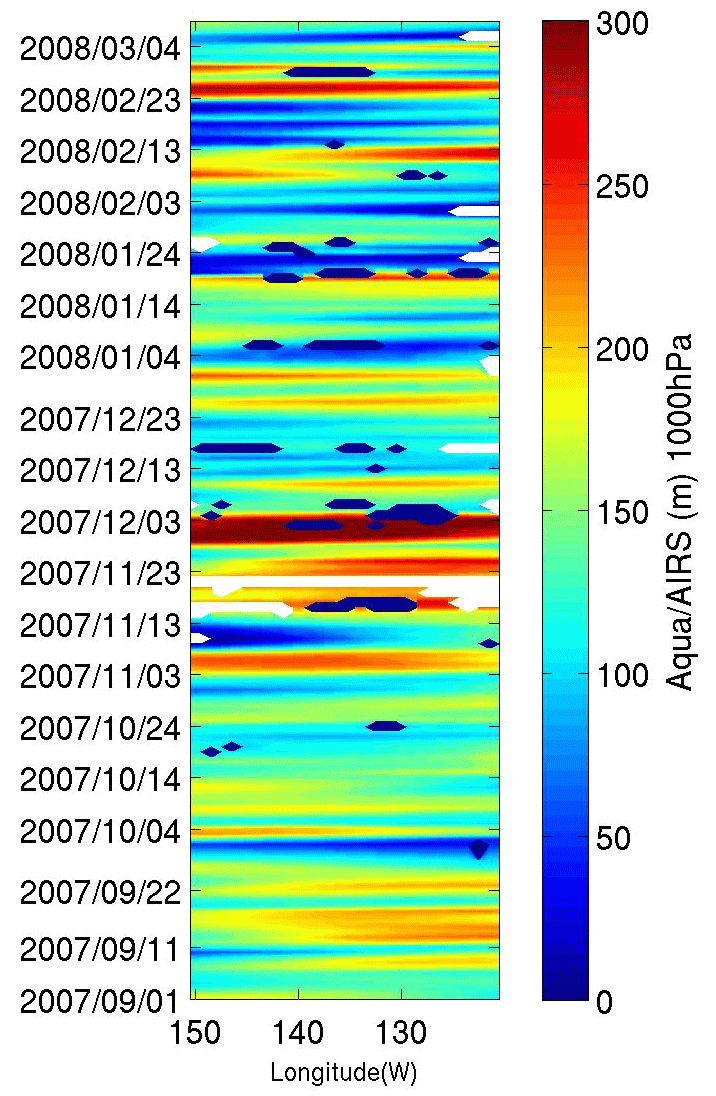
75°N、150W–120W における経度–時間プロットの例。
スクリプト例
旧ページの説明を維持しつつ、重要な処理部分が追いやすいように整理しています。
clear ; clc; close all;

slon=210 ; elon=240 ; slat=75 ; elat=75 ; % 75°N、150W-120W を指定
oflj=['./GPHinCB20072008WIN','-',num2str(slon),'-',num2str(elon),'-',num2str(slat),'-',num2str(slat),'.jpg'];

dirData = dir('*GPH.mat');      %# Get the data for the current directory
dirIndex = [dirData.isdir];     %# Find the index for directories
fileList = {dirData(~dirIndex).name}';  %# Get a list of the files
[x y]= size(fileList);

for i=1:x
  ft = fileList(i); filename=ft{1}
  load(filename);
  ind=find(lon < 0) ; lon(ind)=lon(ind)+360; clear indl;
  year0=str2num(filename(6:9)); mo0=str2num(filename(11:12)); dd0=str2num(filename(14:15));

  sx=find(lon(:,1) >= slon-0.5 & lon(:,1) < slon+0.5);
  ex=find(lon(:,1) >= elon-0.5 & lon(:,1) < elon+0.5);
  ey=find(lat(1,:) >= slat-0.5 & lat(1,:) < slat+0.5);
  sy=find(lat(1,:) >= elat-0.5 & lat(1,:) < elat+0.5);

  GPH0=GPHA(:,:,1); % @1000hPa
  GPH1=GPH0(sx:ex,sy:ey); clear GPH0; % 指定範囲内のデータを切り取り
  lon1=lon(sx:ex,sy:ey); clear lon      % 指定範囲内のデータを切り取り

  if(i == 1) % ここで経度-時間のマトリックスを作成していく
    GPHF=GPH1; lonf=lon1;
    year=year0; mo=mo0; dd=dd0;
  else
    GPHF=[GPHF GPH1] ; lonf=[lonf lon1] ; % どんどん足していく
    year=[year' year0']' ; mo=[mo' mo0']' ; dd=[dd' dd0']' ;
  end
end

vmin=0; vmax=300; labp=vmin:5:vmax;
date=(datenum(year,mo,dd)); lonaxis=lonf(:,1); % X軸、Y軸のデータ
ind=find(lonaxis > 180); lonaxis(ind)=-1.0*(lonaxis(ind)-360); clear ind;
ind=find(GPHF == -9999) ; GPHF(ind)=NaN; clear ind;

figure
contourf(lonaxis',date',GPHF',labp); shading flat ; hold on ; caxis([vmin vmax]); % X,Y軸のデータを指定して描画
h=colorbar;
set(get(h,'ylabel'),'String','Aqua/AIRS (m) 1000hPa','fontsize',12);
set(gca,'Ytick',date(1:10:end))
datetick('y','yyyy/mm/dd','keeplimits','keepticks');
set(gca,'XDir','rev') ; % 軸の反転
xlabel('Longitude(W)');
set(gca,'FontSize',20);
hold off
daspect([15 30 1])
print('-djpeg','-r200',oflj);